Showing Posts From
Automation
- 23 Aug, 2026
Variable Data Printing Software: A Practical Guide
A marketing team has a production problem that looks simple until the spreadsheet arrives. It needs thousands of event badges, each with a different name, organization, photo, and QR code. The design is already approved, but copying fields by hand creates opportunities for misspellings, misplaced images, duplicate records, and outdated artwork. Variable data printing software replaces that fragile repetition with a controlled production system. A team creates a template once, connects fields to structured data, validates the inputs, and renders a complete batch of personalized files. That basic promise is powerful, but the renderer is rarely the hardest part. Data quality, template logic, file construction, delivery tracking, and integration maintenance determine whether a VDP workflow ships cleanly. The category has moved well beyond a niche print utility. One industry estimate values the specialized variable data printing software market at $2.47 billion in 2025 and projects $4.89 billion by 2033, an implied 8.9% compound annual growth rate, while another estimate places the market at $2,113.7 million in 2024 and projects $4,500.0 million by 2035, with a 7.1% CAGR. These are projections from separate market models, but both indicate a software segment that has crossed the billion-dollar threshold and is expected to roughly double over the following decade. DataHorizzon Research's variable data printing software market estimate Table of ContentsWhy Teams Turn to Variable Data Printing Software The template becomes the production assetHow Template Binding and Variable Fields Work Separate fixed elements from variable fields Treat the schema as an interfaceDriving Batches with CSV and JSON Data CSV keeps routine operations accessible JSON supports event-driven automationChoosing the Right Output Formats and Standards PDF/VT belongs in production print conversationsThe Hidden Bottlenecks Most VDP Guides Ignore Data validation fails before rendering begins Integration plumbing creates the expensive surprisesReal-World Use Cases Across Industries Optimizing Production Runs for Speed and Reliability Build for reuse before adding concurrencyBuilding a VDP Pipeline That Actually ShipsWhy Teams Turn to Variable Data Printing Software A badge project exposes the difference between a design task and a production system. One approved layout might contain a fixed logo, event colors, legal text, and background graphics, alongside fields for a person's name, headshot, ticket type, and QR code. A designer can make one badge quickly. Making thousands manually means repeating the same actions while hoping nobody edits a locked element or attaches the wrong image. The same issue appears outside events. A retailer may need localized gift cards, price tags, or promotional graphics for multiple markets. An education team may issue certificates where every recipient receives a different name, course title, date, and verification code. Static design software can produce each file, but it doesn't provide a dependable way to bind records, process a batch, retry failures, and prove which output came from which input.The template becomes the production asset VDP software separates composition from content. Brand elements remain fixed in the template, while approved variable fields accept data from a spreadsheet, database, CRM, or API request. The production pattern is straightforward:A designer builds the layout. The team marks text, images, QR codes, and barcodes as variable fields. An operator or application supplies one record per recipient or item. The renderer creates an output for each record. The workflow delivers files for review, download, distribution, or print.This approach works because a common design doesn't need to be rebuilt for every recipient. Historically, VDP became commercially significant as digital printing matured, since each printed piece could change from a shared data source without requiring a complete redesign. Broader market estimates reflect that transition, including a projection from $9.5 billion in 2021 to $21 billion by 2030 at more than 9% annual growth, and another projection from $11.5 billion in 2022 to $26.8 billion by 2030. The latter model assigns software a revised 12.9% CAGR in its post-pandemic forecast. Grand View Research's variable data printing market overviewProduction rule: Design once, vary only what the record actually needs to change.The practical benefit isn't personalization alone. A well-designed workflow gives marketing and operations teams a repeatable handoff. Designers control the visual system, data owners control records, and engineers control submission and delivery logic. The sections below focus on the parts that usually decide whether that handoff remains reliable under batch pressure.How Template Binding and Variable Fields Work A template behaves like a form letter with carefully defined blanks. The page contains the permanent structure, while selected slots wait for values such as a name, photo, QR code, or barcode. When the renderer receives a record, it fills those slots and produces a complete document without allowing the incoming data to rewrite the entire design.Separate fixed elements from variable fields A dependable template starts with a strict boundary between what changes and what doesn't. Logos, fonts, brand colors, legal copy, margins, and background artwork generally belong in the fixed layer. Names, images, dates, identifiers, and codes belong in the variable layer. That separation prevents a common failure mode: giving an operator too much editing freedom during production. If the workflow allows someone to move a logo while uploading a CSV, the template isn't functioning as a production control. A brand-locked design protects consistency while still allowing a non-designer to prepare records. A visual canvas editor usually exposes fields through labels or variable tokens. The field called recipient_name can map to a spreadsheet column with the same meaning, while portrait_url maps to an image location. A QR field might accept a destination value and generate the code during rendering, whereas a barcode field may require a specific identifier format.Treat the schema as an interface The template schema is the contract between design and software. Developers need to know the available variables, expected data types, required fields, and any default values before sending a payload. Schema introspection makes those variables visible in advance, reducing mismatches such as sending customerName to a template expecting recipient_name. A practical field specification should answer four questions:Is the field required? A missing optional subtitle may be acceptable, but a missing identifier may invalidate the output. What type of value does it accept? Text, image reference, date, URL, QR input, and barcode input shouldn't be treated interchangeably. What happens when content is long? The template needs a defined overflow behavior, not a last-minute guess. Who owns the value? The designer, data steward, or calling application should have clear responsibility.Teams can start with prebuilt variable data printing templates and then tighten the field contract before connecting production data. The software can render the page, but it can't decide whether an empty image, an invalid URL, or a truncated name is acceptable business output. That decision belongs in the template and validation rules.Driving Batches with CSV and JSON Data The data layer determines how easily a VDP workflow can be operated by different teams. CSV suits a human-managed batch. JSON suits an application-managed batch. Both can describe the same records, but they support different ownership models and different error-handling patterns.CSV keeps routine operations accessible Consider a gym producing membership cards. An operations employee exports a spreadsheet containing each member's name, membership identifier, tier, photo reference, and barcode value. The employee uploads the CSV, selects the card template, checks a sample, and submits the batch. Each row represents one member and should produce one output file. That workflow succeeds only when the spreadsheet is treated as structured input rather than a casual list. Column names must match the template schema, delimiters and encoding must be consistent, and image references must resolve. Blank rows, duplicate identifiers, accidental formula text, and inconsistent date formats should be caught before rendering begins. A template for personalized shipping labels illustrates the same principle in a more operational setting. The label may combine a recipient address, order identifier, service level, and barcode, but every field needs a clear source and a predictable fallback. The batch system should report rejected rows separately instead of forcing an operator to guess which record caused the job to fail.JSON supports event-driven automation An application can submit the same information as a JSON payload when a CRM, order system, or membership platform triggers the render. JSON handles nested data and conditional application logic more naturally than a flat spreadsheet. It also supports a clearer relationship between the source record, template identifier, output format, and delivery preferences. Batch APIs need operational controls, not only a render endpoint. Teams should define the maximum records accepted per submission, decide whether a job is monitored through polling or completion callbacks, and attach an idempotency key to each submission. If a network timeout causes the caller to retry, the key lets the system recognize the original request instead of generating duplicate files or duplicate charges. Delivery can take two forms. The service may return a ZIP containing individual files, or it may provide hosted URLs with defined expiration and revocation behavior. Either option should expose record-level errors, job status, and a durable relationship between each source row and its rendered output.Practical rule: A batch is complete only when the system can explain every accepted, rejected, and delivered record.Choosing the Right Output Formats and Standards Output format should follow the destination, not the convenience of the design tool. A social graphic, an Open Graph image, a badge sent to a commercial printer, and a transactional statement may all begin with the same variable fields, but they have different requirements for resolution, color, metadata, delivery, and downstream processing. Web-oriented outputs such as PNG, JPEG, and WebP work well when a browser, email system, social platform, or content workflow consumes the result. A maintained template can generate consistent image assets without asking a generative model to recreate brand typography or layout on every request. For print, a PDF workflow is usually more appropriate because it preserves page structure and supports prepress checks.PDF/VT belongs in production print conversations PDF/VT is the ISO document format most directly associated with variable and transactional printing. It uses a PDF 1.6 foundation constrained by PDF/X-4 and PDF/X-5 rules, allowing composition software to preserve a common static base while varying page content, metadata, and placed assets. That combination supports variable records without abandoning established PDF production controls. PRINT Technologies' PDF/VT standards overview PDF/VT also reduces dependence on a vendor-specific legacy format when different composition systems, digital front ends, and prepress environments must exchange jobs. The format matters most when a print provider needs structured variable records, predictable output intent, and efficient handling of reused resources.Format Best For Resolution DeliveryPNG Transparent web graphics, UI assets, simple social artwork Web or print resolution as configured Direct file or hosted URLJPEG Photographic graphics and compact web delivery Web or print resolution as configured Direct file or hosted URLWebP Modern browser and content delivery workflows Web-oriented output Direct file or hosted URLPrint-ready PDF Badges, certificates, labels, and packaging Print production settings, including 300 DPI workflows Download, stream, or print handoffPDF/VT Structured variable and transactional print jobs Prepress-controlled PDF workflow Digital front end or production exchangeA server-side platform such as Zandovi can return PNG, JPEG, WebP, or print-ready PDF and supports outputs up to 4096 × 4096 pixels at 300 DPI, according to its stated product capabilities. That range is useful when one maintained template serves both web and print destinations, but format selection still belongs to the production owner.The Hidden Bottlenecks Most VDP Guides Ignore Choosing software doesn't solve personalization. It solves one layer of the system, usually composition and rendering. The failures that stop a batch from shipping often occur earlier, when the data is incomplete, the template has too many branches, or the integration depends on manual steps.Data validation fails before rendering begins A malformed CSV can contain valid-looking rows that still produce unusable assets. Image URLs may be inaccessible, identifiers may contain invisible whitespace, and a field that appears numeric may lose leading characters when opened in spreadsheet software. Validation should inspect the file before submission, then preserve rejected records for correction rather than dropping them. Template complexity creates a second class of defects. Conditional branches for language, membership tier, product type, legal copy, and image availability can turn a clean layout into a maze of interactions. Each branch expands the proofing surface, especially when text length changes the visual balance.Integration plumbing creates the expensive surprises An API can be technically correct and operationally brittle. A homegrown pipeline may rely on undocumented response behavior, manually copied URLs, or a callback handler that doesn't distinguish a failed render from a delayed job. When an upstream CRM changes a field name, the renderer may continue accepting requests while producing incomplete files unless schema validation and output checks are in place. Independent coverage identifies steep learning curves, poor documentation, limited exporting, and integration problems among ongoing user difficulties. The same coverage frames personalization as an infrastructure problem, with respondents citing cost at 49%, budget limits at 38%, and difficulty measuring campaign effectiveness at 30%. Those figures don't prove that one vendor or one architecture will fix the problem, but they do support a broader conclusion: teams struggle with the surrounding system, not only the design editor. Coverage of recurring VDP problems and infrastructure concerns A workable governance model includes:Input checks: Reject missing required fields, invalid asset references, and duplicate business identifiers before rendering. Template review: Test long names, absent images, alternate languages, code readability, and conditional paths. Proofing rules: Approve representative records and retain the template version used for production. Delivery observability: Track job status, callback delivery, output retrieval, and record-level failures. Ownership boundaries: Assign responsibility for data, template changes, integration code, and final approval.The renderer is rarely the only bottleneck. Data plumbing and approval governance decide whether the renderer can be trusted.Real-World Use Cases Across Industries The strongest VDP workflows share a pattern. A team defines a stable visual system, identifies the fields that vary, and connects the template to the system that already owns the data. The output might be a printed document, a downloadable file, or a web image, but the operating model stays consistent.Event organizers use VDP software for badges, tickets, passes, and check-in materials. A single template can bind the attendee's name, organization, access category, headshot, and QR code. The event system supplies the records, while the production team reviews representative outputs and prints the approved batch. Educational programs use the same structure for certificates. Course names, recipient names, completion dates, instructor details, and verification codes can vary without allowing operators to change the underlying identity of the program. Teams can begin with certificate templates for variable output and then connect the fields to enrollment or completion data. Retail and packaging teams apply VDP to localized price tags, gift cards, inserts, and short-run packaging. A product identifier, market language, price, promotional message, or scannable code can change from record to record while logos, typography, and regulatory content remain controlled. Membership organizations, gyms, and clubs generate cards with member IDs, tier labels, expiration information, photos, and barcodes. The critical requirement is traceability. An organization needs to know which source record created a card and whether a correction requires a new render or a replacement print. Automation extends these use cases beyond the print queue. A CRM, n8n, Make, or Zapier can trigger an asset when a record changes, then send the resulting file to an email, content, or fulfillment workflow. The same template may produce a 1080p social graphic for a campaign or a 300 DPI print-ready PDF for physical distribution, provided the layout has been designed for both destinations. A practical demonstration can show the full sequence, from variable fields to personalized output: The common thread isn't the industry. It's the replacement of manual repetition with a controlled template, validated records, automated rendering, and a delivery path that people can inspect.Optimizing Production Runs for Speed and Reliability High-volume VDP performance depends heavily on file structure. If every record embeds a fresh copy of the same logo, background, font, or decorative element, the PDF becomes heavier than necessary and the digital front end must process repeated content unnecessarily. Minimizing per-record variation and preserving reusable objects reduces file-processing overhead. Independent PDF/VT guidance recommends using available hints and warns composition-tool operators to avoid inefficient PDF files. The technical implication is direct: cleaner construction and object reuse help a RIP or DFE process personalized batches at production speed. PDF Association guidance for creating VDP print filesBuild for reuse before adding concurrency Template authors should keep static content shared wherever the production system supports it. Variable image treatment should be deliberate, because a unique high-resolution image on every record can dominate processing even when the rest of the page is reusable. A preflight step should check image dimensions, transparency, font embedding, bleed, and barcode placement before a large job starts. Application architecture matters too:Parallel rendering: Send independent requests concurrently when the service and downstream systems support it. Caching: Reuse repeated elements and already-generated assets instead of rendering identical content repeatedly. Idempotency: Attach a stable key to each batch submission so retries don't create duplicate work. Signed callbacks: Use HMAC-signed webhooks and verify the signature before updating job status. Failure accounting: Record failed rows independently and preserve enough context for a targeted retry.A delivery callback should be treated as a state transition, not as a casual notification. The receiving application needs to distinguish queued, processing, completed, expired, and failed states, then handle repeated callback delivery safely.A fast render that can't be reconciled is still a production failure.Transparent metering also matters during large runs. Automatic refunds for failed renders and usage tracking that counts automation clearly help teams reconcile invoices with output, especially when retries and partial failures occur. Reliability is a combination of throughput, clean files, recoverable errors, and understandable billing.Building a VDP Pipeline That Actually Ships A team evaluating VDP software should start with the workflow rather than the feature list. A managed API can handle rendering, scaling, file delivery, callbacks, and batch coordination without requiring the team to operate a headless browser fleet or maintain a custom HTML-to-image stack. A homegrown system may offer deeper control, but it also makes the team responsible for renderer upgrades, concurrency behavior, retries, asset handling, and output validation. The decision should turn on a few practical questions:Can the system expose its template schema before integration? Can it accept both operator-friendly CSV files and application-ready JSON? Does it prevent duplicate work when a request is retried? Can it report partial failures clearly? Does it support the required web and print formats? Can workspace administrators manage roles, API keys, and usage?For teams considering a managed option, Zandovi provides a visual template editor, variable binding for text, images, QR codes, and barcodes, CSV and JSON batch workflows, hosted delivery options, schema introspection, idempotency keys, signed webhooks, and usage tracking. Those capabilities address different stages of the pipeline, but they don't replace data ownership or proofing discipline. The target isn't personalization for its own sake. It's predictable throughput, controlled templates, traceable records, and delivery status that an operator can understand. Audit the current data plumbing, remove unnecessary template branches, validate a representative batch, and choose infrastructure that makes retries, metering, and failed renders visible before the next production run.
- 15 Aug, 2026
Generating Images Inside an n8n, Make or Zapier Workflow (With Just an HTTP Node)
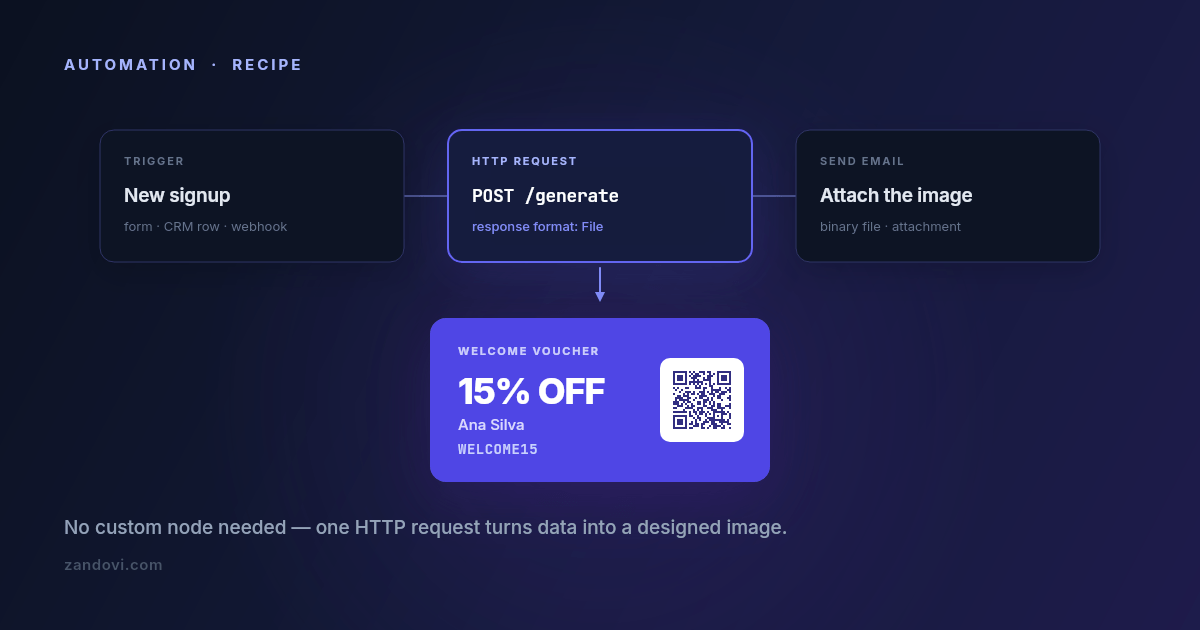
Automation platforms are very good at moving text and data around. A form submission becomes a database row becomes a Slack message becomes an email, and none of it takes code. Then someone asks for the email to include a personalized voucher with the recipient's name and a scannable code on it, and the workflow stops. Every node in the chain handles strings and JSON; none of them draws. The usual workarounds are all bad in the same way. Pre-generating a few hundred images defeats the point of personalizing them. Passing the data to a designer puts a human in a loop that was supposed to be automatic. Spinning up a small rendering service means you now operate a small rendering service. The fix is one node: an HTTP request that sends your values and receives an image back. Up front: there's no native node yet We don't ship an n8n community node, a Make app, or a Zapier integration today. It's on the roadmap and the n8n one is first, but it doesn't exist as you read this, and telling you otherwise would waste your afternoon. What does exist is a plain REST API that returns image bytes, which every one of these platforms can call with its built-in HTTP module. That's what this post sets up. It's four or five fields of configuration, and it works today. The request you're making One endpoint does the work: POST https://app.zandovi.com/api/v1/templates/{templateId}/generateWith a header for your API key, a JSON body of variable values, and a response that is the image itself: raw bytes, not a JSON envelope with a URL inside it. { "variables": { "customer_name": "Ana Silva", "discount_code": "WELCOME15", "expires_at": "30 Sep 2026", "voucher_qr": "https://example.com/redeem/WELCOME15" }, "format": "png", "options": { "scale": 2 } }The one design decision to get right before you touch the workflow: which parts of the image are variables. Any text, image, QR code or barcode element in the template can be one. In the example above, voucher_qr is a QR element whose content comes from the request, so every generated voucher carries its own redemption link. You'll also want the template's exact variable names. Ask the template itself: GET https://app.zandovi.com/api/v1/templates/{templateId}The response lists each variable's name, type and whether it's required. Read calls like this don't consume render quota, so you can call it as often as you like while building. n8n n8n is the most straightforward of the three because its HTTP Request node handles binary responses natively. Start by storing the key as a credential. Create a Header Auth generic credential with name X-Api-Key and your key as the value. Don't paste the key into the node. A credential keeps it out of exported workflow JSON, which matters the first time you share a workflow with someone. Then add an HTTP Request node and configure it:Field ValueMethod POSTURL https://app.zandovi.com/api/v1/templates/YOUR_TEMPLATE_ID/generateAuthentication Generic Credential Type → Header Auth → the credential aboveSend Body on, JSONBody the JSON above, with expressions in place of literalsResponse → Format FileThat last setting is the one people miss. Left on the default, n8n tries to parse image bytes as JSON and you get an unhelpful error. Set the response format to File and the image arrives as binary data on the item, ready for the next node. Use expressions for the values rather than hard-coding them, so they pull from earlier nodes: {{ $json.customer_name }} {{ $json.discount_code }} {{ new Date().toLocaleDateString('en-GB', { day: 'numeric', month: 'short', year: 'numeric' }) }}Then do something with it. The binary property flows straight into a Send Email node as an attachment, a Google Drive upload, a Slack file post, or an S3 node. This is the payoff: the image is now just another piece of data in the workflow.Or ask for a link instead Everything above handles the image as binary, which is why the Response Format setting matters so much. There is a second option that sidesteps that entirely. Add "delivery": "link" to the request body and the endpoint publishes the render and answers with JSON instead of bytes: { "url": "https://img.zandovi.com/s/8f3c2ad9e1b74c05.png", "expiresAt": "2026-09-23T09:00:00Z" }Now leave the response format on its default. There's no binary property to configure, no "Parse response" toggle to remember, and the URL is an ordinary string that maps into a Slack message, an Airtable attachment field, a Notion block, or an <img> tag in an email node like any other value from an earlier step. The trade-off is that the link expires — seven days on the free plan, thirty to a hundred and eighty on paid ones — and anyone holding it can open it. For a workflow that sends the image somewhere within the minute, that's usually the right shape. For anything that has to persist, keep the binary version above and put the bytes in your own storage. There's a fuller write-up, including how other vendors handle retention, in Your Render Came Back as a URL. How Long Does It Last? Make.com Same shape, different labels. Use the HTTP → Make a request module, with the method set to POST and the URL pointing at the generate endpoint. Add X-Api-Key and Content-Type headers, set the body type to Raw or JSON with your variable values mapped in from earlier modules, and turn Parse response off. Leaving "Parse response" off is the equivalent of n8n's File setting. It tells Make to keep the binary payload intact rather than trying to interpret it. The result appears as file data that downstream modules (Email, Google Drive, Dropbox) accept directly. Zapier Zapier is the fiddliest of the three, because its webhook step is built around text and JSON responses rather than binary payloads. The Webhooks by Zapier → Custom Request action (a premium feature) will make the POST. What you do with the response depends on what comes next: attaching raw binary to a later step is where people typically run into trouble. Two paths tend to work better. You can use a Code by Zapier step to make the request and handle the response yourself, base64-encoding it if the next step needs a string. Or you can render, store, then link: push the image into your own storage and pass the resulting URL along, so every subsequent Zapier step is handling a plain string. If your automation lives entirely in Zapier and images are central to it, be honest with yourself about whether the extra steps are worth it versus running this one piece elsewhere. Three details that will save you a support ticket Deduplicate in the workflow, because the generate endpoint won't do it for you. It has no idempotency key: every call renders again and spends another render, even when the variables are identical. Automation platforms retry steps more often than people expect, on their own schedule, so a step that looks like it ran once may have run three times. (The batch endpoint is the exception; it takes an Idempotency-Key header and a retried submission is neither billed nor rendered twice.) Guard it on your side. Store something per event, like a rendered_at timestamp or the resulting file URL on the record that triggered the workflow, then put an IF node in front of the HTTP request that skips it when that field is already set. It's two extra nodes, and it's the difference between a quota you can predict and one you can't explain. Branch on the error code, not just the status. Two different 429s exist. One has code: RATE_LIMIT_EXCEEDED and means slow down, so retry after a short pause. The other has code: QUOTA_EXCEEDED and means you're out of renders for the billing period, where retrying achieves nothing until the reset. A workflow that treats them identically will either hammer the endpoint pointlessly for two weeks or give up on a transient blip. 502 and 503 are worth an exponential backoff. n8n's "Retry On Fail" and Make's error-handler routes both cover this without custom logic. Failed renders are refunded automatically, so a retry after a genuine service error doesn't cost you twice. Watch the quota headers. Every successful render returns X-Quota-Remaining and X-Quota-Reset. A tiny branch in the workflow that posts to Slack when remaining drops below some threshold turns "the vouchers stopped sending" into "heads up, we're at 400 renders left". Cheap to build, disproportionately useful. Recipes worth stealing Welcome voucher on signup. A new row in your CRM or a new form submission triggers the flow, which generates a voucher image carrying the customer's name, a code, and a QR pointing at the redemption URL, then attaches it to the welcome email. Personalized, and nobody touched it. Certificate on course completion. A completion webhook from your LMS triggers a PDF certificate at 300 DPI with the learner's name and a verification QR, which gets emailed with a copy dropped in Drive. This is the automated counterpart to the spreadsheet batch flow, and it's the same template. Social card on new content. A new CMS entry generates a branded card with the title and author, which goes to Slack for approval or straight to the scheduling tool. The design lives in the editor, so marketing can restyle it without asking anyone to redeploy. What to know before you build on this There's no native node yet, so you're wiring HTTP modules. That's a handful of fields, but it isn't a one-click install, and the UI labels above move slightly between platform versions. The concepts hold; the exact field names may not. Rate limits are real. The API throttles per second, so a loop firing hundreds of parallel requests will hit it. Keep concurrency modest and let the retry logic handle the rest. Better yet, if a workflow step fans out over a whole dataset rather than reacting to one event, don't loop at all: submit the rows as one batch job and poll it, which sidesteps both the rate limit and the retry problem in one move. Renders are metered, including the ones your workflow generated by accident during testing. The free tier's 100 renders a month is enough to build and test a workflow properly; a production automation firing on every signup needs a paid plan. Which brings up the last one: watch your test runs. The single fastest way to burn a free tier is a misconfigured trigger firing 80 times while you debug. Pin sample data while building and only go live once the node is right.The API quickstart has the same request in curl, JavaScript and Python if you'd rather test it outside the workflow first. And if you'd find a native n8n node useful, tell us. The order we build integrations in is decided by who asks.